At the end of 2013, Time magazine named Google’s Chromecast Gadget of the Year. A cool little dongle that plays Internet video on your TV for just $35, it provides a fresh approach to Web TV interaction that, in the words of Netflix Executive Todd Yellin, “Could take second-screen TV mainstream.”
There are many devices today that can be hooked up to both your big screen and the Internet. They break down roughly into three categories:
- Smart TVs from vendors like Samsung, Sony, and LG. Many TV’s sold today are smart, although surveys found that half of them are not connected to the web.
- Media Boxes like the Apple TV and Roku family. Their primary purpose is streaming of Internet video, so they are definitely plugged in.
- Game Consoles like the Xbox and Playstation. Though games are their primary purpose, their Web TV capabilities are widely used.
Though clear numbers are hard to find, this data drawn from Streaming Media, Parks Associates, Strategy Analytics, and IDC provides a rough overview of the relative size of these categories (and this is mostly based upon shipment numbers from the various vendors):
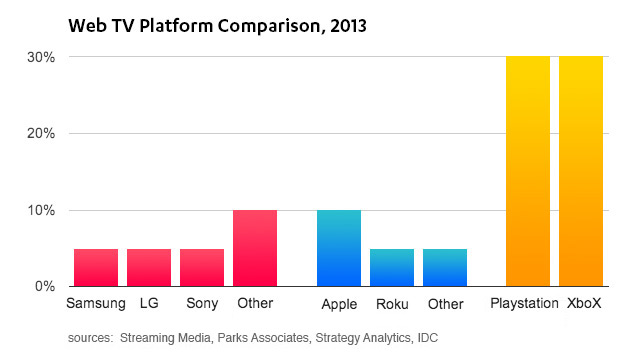
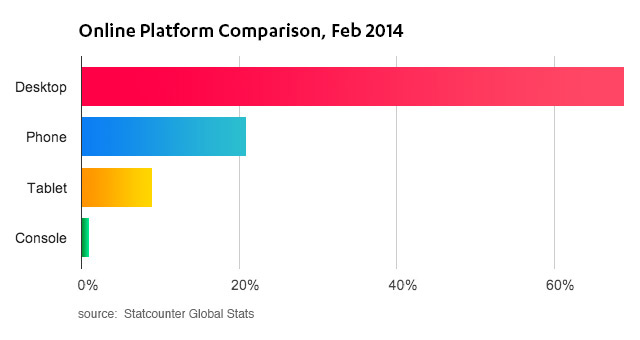
Although game consoles come out on top here, they still account for only a small portion of actual Web usage. For example, in StatCounter’s global device stats, consoles only register as a blip compared to desktops, tablets, and phones:
Roadblocks for further adoption are found on both the publisher and consumer side.
App Development
For the majority of publishers, supporting Web TV platforms is just too hard and too expensive.
Each one of the platforms is powered by a non-standard—often archaic—programming language and developer IDE. Samsung, LG, and Sony all use some derivative of HTML5, paired with buggy SDKs. Xbox and PS3 both use their native SDKs, requiring game dev skills to build media apps. Apple uses objective C and Roku uses Brightscript, a custom VBscript/Javascript lookalike. Getting a streaming video to play is often challenging, to say nothing of the challenges associated with providing advertising and analytics integrations.
Even if the required engineering skills are available to publishers, there’s still the question of ROI: how many people will actually install my app and watch my content on any of these devices? And do the advertising/subscription/marketing gains stack up against the development efforts? Generally, only video-centric publishers that offer broadcast entertainment (i.e. Netflix) can answer this question with a yes. Publishers that offer more niche content or that don’t primarily focus on video cannot justify the effort.
User Experience
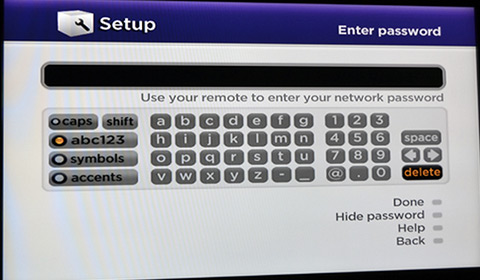
For consumers, the biggest roadblock is user experience. Smart TVs are most often (and rightfully so) criticized for their clunky interfaces, but the UX issues run deeper than that. For starters, the multiple remote controls in today’s living room setup are a problem. Remotes get lost, are often difficult to understand, and are not interoperable. They are also notoriously bad for text input, a requirement for Web TV. Think about the effort required to change the channel, search for content, or login and establish payment credentials.
Another issue is content discovery. On desktop and mobile, this is fast and rich. Search engines, social networks, emails/messages, and hyperlinks all provide us with a vast stream of content to digest throughout the day. On Web TV platforms, there is only a rudimentary app store. While app stores work great for actively finding and installing a limited number of apps we use every day, they do not work for passively snacking on pieces of content. There’s no way for social networks, search engines, website, and email clients to launch content on your TV.
Enter Chromecast
This brings us to Google’s Chromecast, which quite elegantly removes many of the roadblocks described above. It does so by relying on an innovative receiver/app model:
- Chromecast receivers are written in HTML/CSS/JavaScript, which makes development easy and straightforward. A few caveats aside, if a receiver (a.k.a. webpage) works in Chrome, it works on Chromecast.
- Chromecast does not have a remote control. Instead, it relies on your laptop, phone or tablet to discover, launch apps, and play content. Using a standard called HDMI-CEC, it can even wake up your TV.
Moreover, Chromecast’s use of your mobile device for input enables all kinds of interesting multiscreen interactions. For example, the Chromecast YouTube receiver allows attendees to collaboratively manage a Party Playlist from the YouTube app on their iOS/Android phones. The video is still coming from the Internet though, so the receiver will continue to play even if all mobile apps are off.
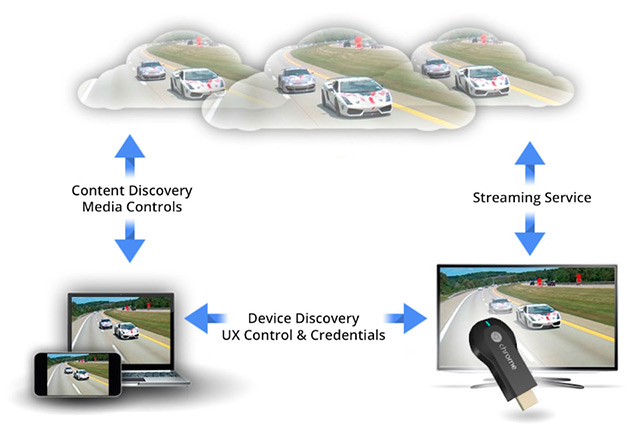
This interaction model with a fully functional receiver is also what differentiates Chromecast from Apple TV’s much praised Airplay functionality. While Airplay provides a way to quickly play a video on the TV screen, it does not have any ability to provide rich logic (like branding/advertising) or interactivity (like playlists/quizzes). In a way, Chromecast is an evolution of Airplay, moving from a dumb receiver to a smart one.
Chromecast is an evolution of Airplay, moving from a dumb receiver to a smart one
What’s Next?
Although no definite numbers have been released, Chromecast is clearly selling well. The device has been an Amazon top seller in Electronics since launch. Google’s CFO called out Chromecast in their latest earnings meet, saying it “was a best seller all quarter”, while Android SVP Sundar Pichai told a SxSW crowd the company has sold “millions”. Next steps are undoubtedly to introduce Chromecast in other countries and to extend sales to more retail chains.
At the same time, competition is not standing still. Apple TV, famously called a “hobby” by Steve Jobs, is now a 1 billion dollar business. As the 2012 Apple TV model is getting cleared through discounts, rumors on new devices are picking up. Meanwhile, Roku just launched a $50 streaming stick that has multiscreen support for YouTube and Netflix. Microsoft also just pushed a software update to Xbox with several enhancements to SmartGlass, its multiscreen technology.
Whichever platform eventually comes out on top, it’s likely the multiscreen UX model pioneered by Chromecast will be a hit. This benefits the thousands of web video publishers around the globe, as it both enables rich interactivity and access to the TV screen.