Flag

We stand with Ukraine and our team members from Ukraine. Here are ways you can help

Get exclusive access to thought-provoking articles, bonus podcast content, and cutting-edge whitepapers. Become a member of the UX Magazine community today!

Home ›› Business Value and ROI ›› 6 Key Questions to Guide International UX Research ›› UXmas 2013: New design, new faces, same festive goodness

UXmas 2013: New design, new faces, same festive goodness

by UX Magazine Staff
2 min read
Share this post on
Tweet
Share
Post
Share
Email
Print

Save

The digital advent calendar for the experience design and research community is back with UXmas 2013.

December is the month of advent, and the experience design and research community has its very own digital advent calendar UXmas.

Last year’s UXmas calendar was a hit and for 2013, UXmas is sporting a brand new design and a motley crew of new and familiar contributors.

“We were blown away with the traffic the site received last year,” UX Mastery co-founder Luke Chambers says. “We launched UXmas partly as a way of giving back to the UX community during the festive season. But mostly we just thought the pun was too good to pass up.”

UXmas is a joint effort from the teams at UX Mastery and Thirst Studios. Each day, a new “gift” to the UX community is unwrapped.
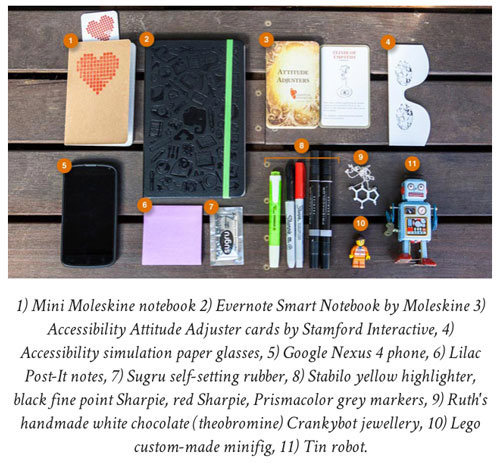
UXmas Tools of the Trade

An excerpt from Everyday UX, showing Ruth Ellison’s workspace.

To date, an infographic about the history of usability, career tips for UX Designers, a comic about personas, and more—including an article from Alison Lawrence of Didus (UX Mag’s niche UX recruiting partner) giving pracitioners insight into selling their skills.

There are also a handful of discounts on training courses and books littered throughout the site, for those looking to up-skill in the new year. Additionally, the site has had a complete redesign, to improve navigation and accommodate for future editions.

“The animated baubles were a neat effect last year, but we soon realized the design didn’t scale very well.” Thirst Studios’ UX Director Benjamin Tollady explains. “This year we’ve gone with a timeline-style layout, with the article of the day appearing at the top.”
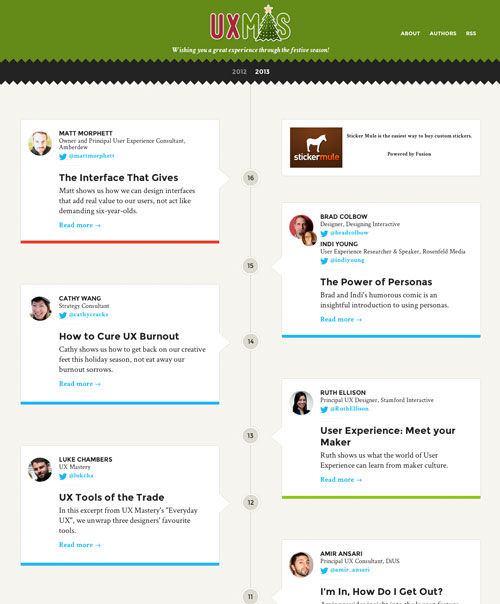
UXmas Timelien

The UXmas redesign shows each unwrapped “gift” as a moment along a timeline.

As with UXmas 2012, some of the best gifts are being unwrapped during the final stretch, so be sure to check under the tree in the lead-up to Christmas Day.


post authorUX Magazine Staff

UX Magazine Staff
UX Magazine was created to be a central, one-stop resource for everything related to user experience. Our primary goal is to provide a steady stream of current, informative, and credible information about UX and related fields to enhance the professional and creative lives of UX practitioners and those exploring the field. Our content is driven and created by an impressive roster of experienced professionals who work in all areas of UX and cover the field from diverse angles and perspectives.

Tweet
Share
Post
Share
Email
Print

Related Articles

Find out how design leaders can build a more inclusive digital world from the ground up.

Article by Pavel Bukengolts
Championing Accessibility: a Path to Inclusive Design Leadership
  • The article highlights that designing for accessibility isn’t about following rules. It’s about making sure no one gets left out of the digital world.
  • The piece explores how building accessibility from the start, with the help of AI and the right mindset, makes the result better for everybody.
Share:Championing Accessibility: a Path to Inclusive Design Leadership
4 min read

Discover how a simple comprehension test reveals if mobile content is too hard to read.

Article by Paivi Salminen
Why Reading on Mobile Is Uniquely Challenging
  • The article explains why mobile reading is harder: small screens and distractions make people miss information even when it’s there.
  • It introduces the cloze test, which removes words to measure real understanding: comprehension drops from 39% on desktop to 19% on mobile.
  • The piece argues that mobile content needs simpler language because the real question is: Does this make sense when life gets in the way?
Share:Why Reading on Mobile Is Uniquely Challenging
4 min read

Learn how to build systems where design explicitly models development, handoff is automatic, and AI can extend your work reliably.

Article by Jim Gulsen
Your Design System Works in Figma. Does It Work in Code?
  • The article explains why many design systems don’t work well: designs made in Figma don’t translate well into code.
  • It introduces five practices: structure frames like code, use fewer components with more variants, organize by how both designers and developers actually work, let AI check your naming, and build documentation into your daily workflow.
  • The piece says that good design systems are the same in design and development, and when they match, everything just works.
Share:Your Design System Works in Figma. Does It Work in Code?
6 min read

Join the UX Magazine community!

Stay informed with exclusive content on the intersection of UX, AI agents, and agentic automation—essential reading for future-focused professionals.

Hello!

You're officially a member of the UX Magazine Community.
We're excited to have you with us!

Thank you!

To begin viewing member content, please verify your email.

Get Paid to Test AI Products

Earn an average of $100 per test by reviewing AI-first product experiences and sharing your feedback.

    Tell us about you. Enroll in the course.

      This website uses cookies to ensure you get the best experience on our website. Check our privacy policy and