Flag

We stand with Ukraine and our team members from Ukraine. Here are ways you can help

Get exclusive access to thought-provoking articles, bonus podcast content, and cutting-edge whitepapers. Become a member of the UX Magazine community today!

Home ›› Review: UX Archive

Review: UX Archive

by Andrew Zusman
3 min read
Share this post on
Tweet
Share
Post
Share
Email
Print

Save

UX Archive is a great resource for comparing user flows, but the direction of the site’s growth is unclear.

Buttons, scrollbars, drop-down menus, borders, windows, rollers, cursors, and all sorts of other widgets are the playthings of UI designers. Buttons are for pushing, rollers are for rolling, and knobs are for turning.

User experience deals with how these individual actions feel, but more importantly, a user’s overall experience on web or mobile. This includes making sure users can understand text, navigate with ease, and make smooth transitions—creating seamless user flows so that the product elicits an appropriate emotional response.

Essentially an archive of successful user flows, UX Archive shows a cycle of specific events through individual high-definition screen shots of each process. While currently focused on top-quality apps for iPhone, the site gives viewers a broader understanding of the UI for each individual step and how it contributes to the overall experience.
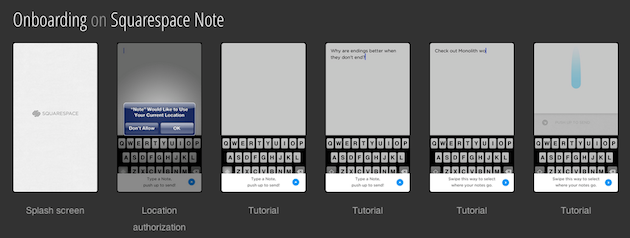
The chain of events shown on the site helps to clarify the architecture of the apps as well as exhibiting the general feel, with events split in to five different sections: exploring, onboarding, searching, sharing and sign up. The “exploring” feature highlights browsing, and the “onboarding” feature shows the process from splash screen to launch. The “searching,” “sharing,” and “signing up” features are what one might expect.

The fact that the events are not combined—no single group of photos showing all five events together—actually makes the site more useful. The short, staccato bursts are very helpful in highlighting specific methods for showing the same processes. UX Archive should be commended for being easy to use and providing a great user experience itself—websites built for UX professionals draw in users who expect a great user experience, and UX Archive delivers.

UX Archive also builds an element of curiosity by highlighting a question at the top of the home page: “How do the best apps handle _____?” The question engages the user and drives the content forward—with the blanks filled in by one of four events noted above. The images showing the process chains for each application are visually appealing and the site is easy to use and well maintained.

At present there are only a handful of applications listed (and, as I mentioned, they are limited to those for iPhones). Clearly the archive will continue to grow, but the direction of that growth is unclear. If everyday users are allowed up upload their own apps, the beauty of the site could be compromised. If the site managers allow only certain apps to be uploaded, the site will maintain its high level of quality but might not have the quantity of content to keep a high profile among UX professionals. Only time will tell how this issue will be resolved, but judging by the look and feel of the site at present, it seems likely that the issue will be handled in a user-friendly way that keeps UX Archive unique and interesting.

Graphic designers have been especially eager to show off all sorts of fun and interesting user interface and navigational tools, with sites like UI Parade, Behance, and Dribble all presenting really great user interface controls, but UX Archive has taken the extra initiative by highlighting great user experience on the macro level. Hopefully this vision will spark even more interest in great user experience design.


post authorAndrew Zusman

Andrew Zusman
Andrew Zusman is a user experience designer at Inkod-Hypera and the creator of the 52 Designers project. Andrew is also the writer of a popular user experience design blog. He lives in Tel-Aviv, Israel with his girlfriend Natasha and their dog Indy.

Tweet
Share
Post
Share
Email
Print

Related Articles

Learn when to talk to users, and when to watch them in order to uncover real insights and design experiences that truly work.

Article by Paivi Salminen
Usability Tests vs. Focus Groups
  • The article distinguishes between usability tests and focus groups, highlighting their different roles in UX research.
  • It explains that focus groups gather opinions and attitudes, while usability tests observe real user behavior to find design issues.
  • The piece stresses using each method at the right stage to build the right product and ensure a better user experience.
Share:Usability Tests vs. Focus Groups
2 min read

Explore how interaction data uncovers hidden user-behavior patterns that drive smarter product decisions, better UX, and continuous improvement.

Article by Srikanth R
The Power of Interaction Data: Tracking User Behavior in Modern Web Apps
  • The article explains how interaction data like clicks, scrolls, and session patterns reveals real user behavior beyond basic analytics.
  • It shows how tools such as heatmaps and session replays turn this data into actionable insights that improve UX and product decisions.
  • The piece emphasizes using behavioral insights responsibly, balancing optimization with user privacy and ethical data practices.
Share:The Power of Interaction Data: Tracking User Behavior in Modern Web Apps
14 min read

Explore how design researchers can earn the trust and buy-in that give studies impact, even as AI shifts how teams work.

Article by Sara Fortier
Earning the Right to Research: Stakeholder Buy-In and Influence in the AI x UX Era
  • The article emphasizes that synthetic data and AI tools promise speed, but not the alignment or shared purpose that makes design research effective in solving design problems.
  • It asserts that meaningful human-centred design begins with trust and the permission to conduct research properly (i.e., strategically).
  • The piece outlines how to build stakeholder buy-in for design research through practical strategies that build influence piece by piece within an organization.
  • Adapted from the book Design Research Mastery, it offers grounded ways to enable impactful user studies in today’s AI-driven landscape.
Share:Earning the Right to Research: Stakeholder Buy-In and Influence in the AI x UX Era
12 min read

Join the UX Magazine community!

Stay informed with exclusive content on the intersection of UX, AI agents, and agentic automation—essential reading for future-focused professionals.

Hello!

You're officially a member of the UX Magazine Community.
We're excited to have you with us!

Thank you!

To begin viewing member content, please verify your email.

Get Paid to Test AI Products

Earn an average of $100 per test by reviewing AI-first product experiences and sharing your feedback.

    Tell us about you. Enroll in the course.

      This website uses cookies to ensure you get the best experience on our website. Check our privacy policy and