Flag

We stand with Ukraine and our team members from Ukraine. Here are ways you can help

Get exclusive access to thought-provoking articles, bonus podcast content, and cutting-edge whitepapers. Become a member of the UX Magazine community today!

Home ›› Business Value and ROI ›› 6 Key Questions to Guide International UX Research ›› Usability Tip: Make it Easy to Get out of Panic Mode

Usability Tip: Make it Easy to Get out of Panic Mode

by Tammy Guy
2 min read
Share this post on
Tweet
Share
Post
Share
Email
Print

Save

Users like to be able to quickly abort noisy videos and the like when they open them by accident.

Reading through headlines on the CNN mobile app, I tapped one of the articles with a play icon next to it not realizing a video would start playing instantly (as opposed to first directing me to an article with an embedded video). I was out in public, and immediately tried to find a way to turn the video off, but missed the cancel button with my finger and the video started to play. Without paying attention to the actual content, I then tried my luck tapping aimlessly on the screen. Relieved I was able to put an end to video playback, I found myself on a Verizon page not knowing how I ended up there or how to get back to the article I wanted to read.

Trying to retrace my actions, I realized that, while in panic mode, I tapped the video during the first couple of seconds of a Verizon ad, which is how I ended up on the Verizon screen. I also realized I completely overlooked the X button in the bottom right corner, which would have brought me back to my article with the video embedded in it. Instead, I tried the Menu option on the top right. When I saw that it was all Verizon options, I ended up closing my app window and starting all over.

My Experience:
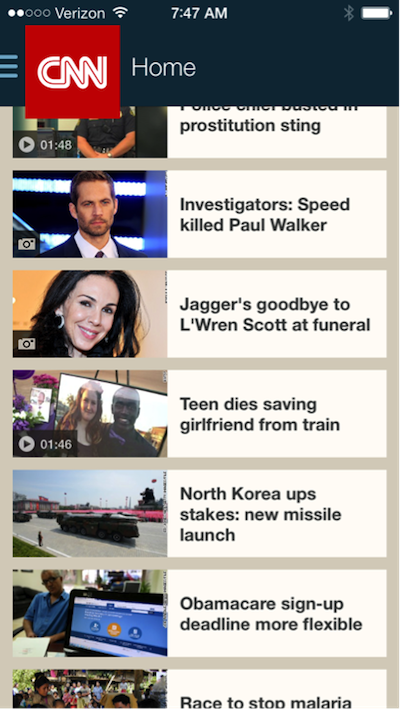
CNN Mobie App

CNN mobile app home page

CNN Mobile App Video Loading

Video starting (this is where I missed the cancel button with my finger)
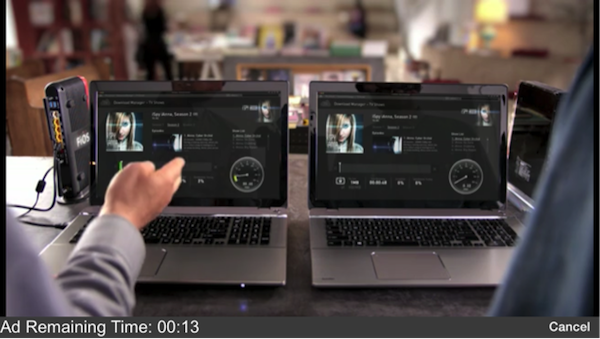
Verizon Ad

Video started to play with a leading Verizon ad

Verizon Ad in CNN App

Verizon ad within CNN application (with a hidden back button)

Feeling a little foolish for not realizing a video icon meant instant play, I looked back and realized there were multiple user interface solutions that could have prevented this usability issue.

  1. The cancel button on the screen where the video started to play could have been larger and could have read: “Stop video.”
  2. Adding stop or pause icons to the bottom of the video screen once the Verizon ad began could have been useful.
  3. Increasing color contrast for action items on the Verizon screen would have made it easier to locate them on the page.

If you want users to find their way around your site, primary and secondary action items must be visible—especially when a user is rushing and in a panic. Have you ever tapped somewhere on the screen only to launch yourself into panic mode? How easy was it to get out of the unwanted situation?

Primary and secondary action items must be visible—especially when a user is rushing and in a panic

Send us your samples and let us know how the user interface could have prevented a prolonged panic using the hashtag #UXpanic.


Image of panicked man on smartphone courtesy Shutterstock.

post authorTammy Guy

Tammy Guy
Tammy Guy is the founder of a visual design and usability consulting firm focused on strategic brand planning, creative direction and diffusion of user experience problems by applying design theory and usability best practices in a rapidly changing Web environment. Her firm provides consulting services (e-commerce solutions, mobile apps and tablet experience) to clients from various industries such as fashion retail, commodity retail, pharmaceutical, insurance, financial services, social networking and others. Services include product evaluation, strategy and planning, creative development and direction and usability consulting. With more then 16 years of experience, Tammy previously worked as the Creative Director at LivePerson, Inc. and was a Design Group Manager at the Hertz Corporation where she art-directed all aspects of graphical application development for all customer facing websites. In addition, Tammy has been a frequent guest speaker with the Nielsen Norman Group for the past few years, teaching visual design and usability workshops. She also teaches similar design and usability courses with General Assembly in New York City.

Tweet
Share
Post
Share
Email
Print

Related Articles

When a traveler loses her bag, a simple UX flaw turns inconvenience into chaos. What if smart design and AI could turn that moment into a story of trust instead?

Article by Krystian M. Frahn
UX Promptly Needed: a Railway Digital Transformation Story
  • The article shows how poor UX design in railway lost and found systems creates frustration and inefficiency for passengers and staff.
  • It argues that applying human-centered design and AI-powered tools, such as QR-based tracking and digital reporting, could transform the process into a seamless, trust-building experience.
Share:UX Promptly Needed: a Railway Digital Transformation Story
3 min read

AI is changing how designers work — speeding up workflows, sparking creativity, and taking care of the tedious parts. But it’s not here to replace designers — it’s here to amplify their insight, empathy, and impact.

Article by Nayyer Abbas
AI Boosts for UI/UX Designers: Fast Growth with Smart Tools
  • The article explores how AI transforms UI/UX design by automating repetitive tasks, speeding up workflows, and enhancing creativity across ideation, prototyping, and research.
  • It argues that AI empowers rather than replaces designers, freeing them to focus on insight, empathy, and strategy while maintaining ethical and user-centered design.
Share:AI Boosts for UI/UX Designers: Fast Growth with Smart Tools
5 min read

AI didn’t just change work — it removed the starting point. This piece explores what happens when early-career jobs vanish, and why the most “future-proof” skills might be the oldest ones.

Article by Pavel Bukengolts
AI, Early-Career Jobs, and the Return to Thinking
  • The article illustrates how AI is quickly taking over beginner-level jobs that involve routine work.
  • The piece argues that the skills that remain most valuable are human ones, like critical thinking, communication, big-picture understanding, and ethics.
  • It suggests that companies must decide whether to replace junior staff with AI or use AI to help train and support them.
Share:AI, Early-Career Jobs, and the Return to Thinking
5 min read

Join the UX Magazine community!

Stay informed with exclusive content on the intersection of UX, AI agents, and agentic automation—essential reading for future-focused professionals.

Hello!

You're officially a member of the UX Magazine Community.
We're excited to have you with us!

Thank you!

To begin viewing member content, please verify your email.

Get Paid to Test AI Products

Earn an average of $100 per test by reviewing AI-first product experiences and sharing your feedback.

    Tell us about you. Enroll in the course.

      This website uses cookies to ensure you get the best experience on our website. Check our privacy policy and