ARTICLE NO. 507    March 24, 2010

The Impossible Bloomberg Makeover

Redesigning the Bloomberg Terminal would be any interface designer's dream. There's obviously much room for improvement since the interface hasn't changed for a long time, and the personas using it are quite easy to define.

But the complexity and richness of the displayed data, the necessity to fully understand how traders use the tool, and the immediate impact on the work efficiency of more than 156,000 users around the world make it tremendously challenging to make any changes.

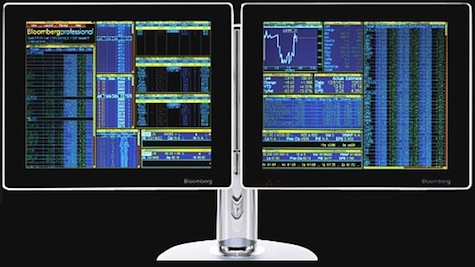
Here is a picture of the Bloomberg Terminal as it stands today (2010). As most users say, "it's hideous."

The current Bloomberg UI

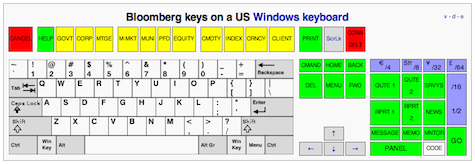
Here is the Bloomberg keyboard:

The Bloomberg keyboard

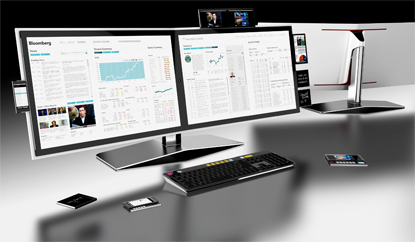
IDEO has submitted a redesign proposal back in 2007 after a 3-week study. Here's how it looks:

IDEO concept design

A widget allows you to zoom in on some detailed part of IDEO's design and have some explanation on the choices they've made. You can also read a short description of the project on their website.

But as a PortFolio.com article clearly puts it: "Bloomberg isn't looking to do a major overhaul of its terminals' graphic design anytime soon. In fact, company executives see the Bloomberg terminal's unique presentation as a status symbol and a selling point. 'We have to be religiously consistent' to satisfy users who become attached to terminal's look and feel, says Bloomberg chief executive Lex Fenwick. 'You can see a Bloomberg from a mile away.'"

The Bloomberg terminal is the perfect example of a lock-in effect reinforced by the powerful conservative tendencies of the financial ecosystem and its permanent need to fake complexity.

Simplifying the interface of the terminal would not be accepted by most users because, as ethnographic studies show, they take pride on manipulating Bloomberg's current "complex" interface. The pain inflicted by blatant UI flaws such as black background color and yellow and orange text is strangely transformed into the rewarding experience of feeling and looking like a hard-core professional.

The more painful the UI is, the more satisfied these users are.

The Bloomberg Terminal interface looks terrible, but it allows traders and other users to pretend you need to be experienced and knowledgeable to use it. Having been a user of the Bloomberg Terminal for five months, it took me a week and a few painful hours to handle it, and I am no genius. The only real impediments were the unbearable UI, remembering which key to push to make the "magic" work, and having to go through the 86-page manual.

Bloomberg's terminal interface will not evolve any time soon both because of the leadership Bloomberg has on the market and because users will not be satisfied with something simpler and more efficient.

Bloomberg is an extreme case of a common UI phenomenon where users take pride and find highly rewarding to handle a painful interface. Obtuse UIs are generally only accepted by early adopters of brand new or highly innovative services. Most of the time, the success of the service and the growth of its user base makes it both necessary and natural to redesign the UI. But despite the fact that Bloomberg is a market leader and has a large user base, this pattern of UI evolution hasn't come to pass.

The only valid reason explaining why the Bloomberg design will not change is the behavior of its users. Users who favor complexity and clutter over efficiency and clarity to sustain a fictive status symbol.


 

ABOUT THE AUTHOR(S)

Comments

Add a new comment

Because of problems with spam comments, HTML in comments is not permitted. URLs are allowed, but they will not be rendered as clickable links.
It's pretty obvious your UI design knowledge is purely academic. Bloomberg's interface is beautiful, has good data/area ratio and is consistent. If you want to browse web on your iPad that's fine, but you have no idea how traders work. There is no time for point-and-click, and you do learn because you repeat same commands hundred times a day.
IMHO, this article just reinforces the stereotype that UI/UX designers are full of themselves, ignorant, and don't actually understand the needs of their users. Very disappointing. :(
The BBG interface is way better than the garbage used in the US healthcare industry. If you ever want to be truly scared, just take a peek at the interface of the electronic medical record your doctor uses to track medications, order labs, review results, etc.
In our practise we find this is often true, that the considerations of culture trump the ideals of design.
It happens more. But there's a difference in what people want and what they need.
This article has a point in that it does have an ugly interface. On the other hand, the "proposed" design is laughable. First of all, it took 3 WEEKS to build that? I would have guessed 3 hours. It looks like every financial news site on the internet, great work. Aside from the color scheme it's the most comprehensive analytical tool available by miles. If it was so easy to redesign and made so much sense, I'm sure you'd be redesigning, marketing your superior Bloomberg machine and making millions rather than writing about doing it.
@Danielle: Let's be realistic, Bloomberg pays its enormous support staff millions of dollars each year. Those dollars in turn come from terminal sales. In other words, there is a reason you pay nearly $2000 per month to own a terminal. 24/7 support is included in the price, if not explicitly. My point in earlier posts is that a complete overhaul of the Bloomberg interface is unnecessary. In fact, I appreciate the comments from long-time users affirming this. However, everyone here should realize that all kinds of market players use Bloomberg, not just hardcore traders that must move as quickly as possible and don't mind the pain of learning the command line. Analysts, journalists, economists, and recently even legal professionals need data from the terminal. If you obscure that data with illogical, inconsistent command line codes and strange user interface conventions ("How the hell do I log off? Oh right, press Conn Default on my keyboard. What?!"), be prepared to field thousands and thousands of support calls each day. Those cost Bloomberg tons of money and ensure clients pay a premium, as we discussed earlier. Clearly the sheer volume of support issues Bloomberg handles confirms the need for a more consistent, transparent, forgiving user interface.
@ Tom Ablewhite They actually don't charge for support/consultancy. It's totally free and you can have as much as you want with the subscription. I think they're help desk and consultants are pretty stellar actually.
Seems like Bloomberg is doing something right with over $6 BILLION in revenue. Maybe the interface is not "cutting-edge", but the analytics and powerhouse tools Wall Street needs are. No other market data provider comes close to what Bloomberg has to offer. Odds are 98% of the people commenting on here have never used a Bloomberg.
If any of you have read any of my writings on OCGM or NUI, you would imagine that I would eventually gravitate towards this particular interface. I am currently at Microsoft and I thrive on extremely complex problems like this. I just love them. I have done a bit of work on Windows 7, Surface, etc. I recently had the chance to go through a Bloomberg Terminal with some expert users and see some typical user scenarios. I took a shallow dive into the experience and I came out with some reaffirmations to what I already knew. These problems need to be thought of differently than what most are used to. The author states: The pain inflicted by blatant UI flaws such as black background color and yellow and orange text is strangely transformed into the rewarding experience of feeling and looking like a hard-core professional. I'm sorry, but this is naive. Orange on Black: If this is so painful, then most vehicles in use today have painful UIs correct? If that is true, why don't we all have white dashboards with text on them. I'm not talking about the edge cases (some odd engine error), I mean for simple things like 'washer fluid' this is by far less important than a specific number flashing on an analyst's screen. UIs are different. Each serves a need and a purpose. See, what the author and some of you are doing are trying to apply a cut and paste 'UI Test' to something in its own class. Just because you read the 'top 10 UI mistakes' from Smashing Magazine or useit.com, a UX Design Tester, it does not make you. STOP trying to apply tired old web principles to software design. This product isn't made to appeal to the masses, or to other designers, this is made to appeal to people that need to get X done in Y time, and do it consistently within Z time. I would challenge any of you to think of this in this way. Its time to make it more efficient, more complex, and more multi-linear. Instead of going from A to B, go from A to B, B, C; and B goes to C, C , D. Think about what we can ascertain from the user at any given moment and try to help them along the way. Instead of trying to backwards customize the interface around the user, allow the user to 'push' the interface along and have it change its direction. The user's are already experts! Use that knowledge to give them more, and more, and more! This isn't about building a better mousetrap, its about building a trap that catches more mice with the same or less interaction. If you continue to think of these problems in the old way (oh, lets make it simple!), you will continue to coerce and push products down the same path (dumbed down beyond usefulness). I highly recommend a nice refresher course by reading Norman's Emotional Design book. PS: If IDEO came to me with that redesign I would send them packing with that garbage. I have never found much use for 'forward thinking' design studios and we have hired hundreds of them over the years on my teams at Microsoft (Windows 7, Surface, Advanced Design Team, Zune, etc.) Obviously, I do not speak for everyone at any of my employers...my opinions are based on my personal experiences as me myself and I.
I've had a Bloomberg on my desk for four years now. One thing to understand about the Bloomberg terminal UI is that there is a command line at the top of the terminal screen (actually there are 4 terminal screens which you can switch between by pressing the tab key). This command line is the primary method of controlling the interface. So if I wanted to plot a graph of IBM I could type "IBM US Equity GP" and press enter and it would bring up the chart with some real-time data. I could use the mouse to manipulate the graph, but the primary mechanism of control is the command line (i.e. keyboard). Now, you might as why "GP" means ... Well it stands for "Price Graph" but the letters are inverted for whatever reason. But once you know the commands, it's the most efficient method of quickly pulling up information in the middle of a fast moving trading market. The greatest improvement that Bloomberg probably ever made to its UI is that the command line now has auto-complete feature, so as soon as you start entering a command it shows a drop-down list of auto-completion matches. People who become proficient with the Bloomberg command line interface can be extremely efficient with it (much more efficient than a point-and-click GUI would allow). Thomson Reuters already offers a competing product called Xtra 3000 which looks a lot like IDEO's proposal (i.e. point-and-click navigation, white background, etc). But the lack of a command line interface makes it next to useful for power users. Traders know that the command line is a superior interface due to their experience with Bloomberg. Another example of this phenomenon is in software industry itself, where the more productive and knowledgeable users all use command line interfaces (UNIX shell on Unix / Linux / OS X, and PowerShell on Windows) ... some will even swear by command line text editors like emacs or vi. These people are not idiots, nor do they use the command line just to "look smart," it is a legitimate productivity issue. And judging from this article it looks like very few UI designers actually understand this. I'm sure Bloomberg would be very interested in seeing new, cutting edge user interface proposals from companies like IDEO, but in order to be taken seriously they MUST keep the command line the centerpiece of the interface. Otherwise it's just a budget version of Bloomberg (like Reuters). By the way the foreground and background colors on Bloomberg are fully customizable, you can turn it into a white background if you want (but nobody does because it ends up looking ugly and distracting). I'm not sure why UI designers all think a white background is better ... it seems to me that the text and numbers stand out better if the background is black. But a serious UI designer would just actual statistical data about users in order to decide what type of color scheme is best.
If the UI they've got works well enough and isn't prohibitively hard for anyone to learn (as it obviously isn't, or we'd be running out of traders by now), then why spend money to change it at all?
"The pain inflicted by blatant UI flaws such as black background color and yellow and orange text is strangely transformed into the rewarding experience of feeling and looking like a hard-core professional." "I am quite certain that a white background is better than a black one for reading." This is something that has really baffled me for the longest time--that designers insist that a white background with dark text is better than white text on a black background. This is really just habit rearing its head because designers are used to working with paper. Paper is a reflective medium, meaning it subtracts light. Computer monitors, on the other hand, *are* light. Looking at white on a monitor is no different than looking at a light bulb. It strains the eye. Have you ever heard someone complain that they can't read for long on a computer and prefer paper? This is why. Having a black background with bright text on a monitor is much easier on the eye. Ever wonder why IT folks who use terminals use white on black? Have you ever wondered why movie credits are white on black? UX Designers really need to get over this one. Colored and/or black backgrounds on a light projecting medium are a good thing. Stop thinking it's paper.
The most sensible post I've seen here so far
Build something that's fairly unique but complex and charge a fortune for consultancy & support. It's an out dated business model. Openness, ease of use, strength of content is the way forward.
@WhatDoUKnow: You're right, Launchpad helps stitch together the disparate command line codes of the terminal into a single screen, but I'd like to make a few key points. First, you must know the command line codes for company management, financial analysis, earnings, etc. in advance. As per my post above, the Autocomplete feature helps only when you enter keywords the terminal understands, i.e. company description. Tearsheet may be a valid keyword now (I don't have my terminal in front of me to test whether an update was made), but even so, there are countless examples of the command line failing due to a rigid keyword interpretation algorithm. Second, Launchpad has its own navigation challenges. Sure, you could use the command line code LLP to change a particular terminal screen into a Launchpad window, but that only works in some cases (just try it on MSG). As for relative strength index, analyst recommendations, and the other codes you mentioned, you'd have to hunt through the Launchpad menus to find them, and please trust me on this point: many, many clients are not nearly as savvy as you. They call Bloomberg support and carry out conversations for an hour just to build the Launchpad screen you describe. So again, you are totally right, a tearsheet can be custom built on the terminal, but that wasn't my original point. My point was to confirm J.Cer's observation about the command line interface, i.e. that search isn't so hot and that you must know in advance what to enter, otherwise get ready for a conversation with Bloomberg support. Launchpad helps, but you must know it exists (run the command line code BLP), know how to navigate its complicated (maybe not for you, but for other users) menus, know how to group its components via the Group Manager, etc. Not exactly obvious stuff...just ask Bloomberg support. It's a decent system, but there's clearly room for improvement.
J. Cer: There isn't a global search, and that's a shame. MSGS will search messages. NSE will search news. For rendering PDFs globally, you can set up a PDF printer (via Adobe Acrobat) and let the [Print Screen] key make them for you.
@Trader... Are you sure you are a Bloomberg Terminal user? Have you used the dreaded LauchPad? Those tiny-winny screens can be interlock to provide you with all the tearsheet info you want for a given company. Setup a LauchPad then open small windows with the following: MGMT, FA, ER, CN, GPO/RSI/MACD, DVD, ANR, RV, etc... Need I say more? You change the company and all the rest of those small windows will change info relative to the given company. Give me your name and I'll call you to help you set it up. It will take 1min. Not 15mins. Maybe your whinning takes 14mins.

@Douglas


You could also use AppViz by IdeaSwarm to painlessly import and archive your iTunes financial reports

http://www.ideaswarm.com/products/appviz/


Bloomberg Terminals are a joy to use The learning curve is not steep at all, once you learn that, despite the cryptic commands ("PLST"?) if you just start typing what you want to do, a dropdown list will appear that will invariably contain the command you need. P-o-r-t... there it is, PLST - Portfolio Listing
I appreciate that a bad user interface can make an easy task hard to accomplish by increasing the learning curve. But I'd like to delve into why that learning curve might not be such a bad thing. For example, I wrote a small iPhone app called Daylight Map. Each day, Apple lets you download a zip file which contains a txt file, which in turn contains a table of sales figures for that day. I want to take, say, a month's worth of these files, and put them in a spreadsheet so I can calculate totals and draw pretty graphs to make myself feel happy. Without much learning, anyone can sit down and unzip each of these files (double click), open them up in notepad (double click), copy the sales figures for each day (select, Edit->Copy), and then paste them into a spreadsheet (select a new row, Edit->Paste). Each step is easy, but that "easyness" doesn't translate into making is faster or simpler to perform the task. The amount of work stays the same, even if it is easy work. The alternative is to use magic, and I suspect that for the Bloomberg system's magic is described in depth in that 86 page manual. Here's the magic I used, typed into my Mac's terminal: gunzip sales/*.gz ; cat sales/*.txt | grep Daylight > sales.tab That magic takes a folder full of zip files and unzips them (gunzip sales/*.gz) then takes the content of each text file (cat sales/*.txt) and look for lines which mention my product (grep Daylight) and copy them into a new file which I can open in Excel ( > sales.tab). Now, the knowledge about how to do that magic was hard won, built up over years, learning which tools there are on my computer and how to use them. More work than reading a 86 page manual. But now I can put that magic in one file, and when I double click on it I get a spreadsheet with all my sales information in it. One double-click regardless of how many day's worth of data I need to unzip. That is easier than the copy-paste solution, even though copy-paste itself is easier to use than "cat" (which stands for "conCATenate", by the way.) Brining it back to the Bloomberg interface: perhaps those magic keys take some time to learn, but what if, once you've learnt some of the magic, things become even easier than what seemed easy before? A simple possibility: those magic keys, probably to take you form one place to another, right? Without having to have visual bits of UI to click on, you've made it easier to see more information. Having to learn what pressing X does makes it easier to see more data data on the screen at once, since you don;t need a button in the UI to do X, making it easier to do your job. And the cost is a one-off increase in the learning curve. But if you're going to use a tool for months on end, is a week's worth of learning curve all that much of a problem? On the other hand, the Bloomberg UI might be a pain to use even once you have learnt it. In which case, sure, lets build a better one :-)

Whoa, easy there "i.f. stoner." I'm not surprised that this article is controversial, and it's great to have so many passionate, intelligent comments, but please don't cross the line into vitriol. I'm tempted to delete your comment, but I'll respond instead:

The author cited his source for that quote: a Portfolio.com article by Zubin Jelveh. The article is from July of 2007, which is why Lex Fenwick was the one speaking for Bloomberg. I've run searches on several unique word series from the article and found only references to this original work, so this is not a "cut and paste job." Please don't accuse people of bad journalism if you yourself aren't going to take the J-school 101 step of checking your facts.

THIS ARTICLE IS BULLSH*T. LEX FENWICK HASNT BEEN AT BLOOMEBRG FOR MORE THAN A YEAR...WHERE DID THESE QUOTES COME FROM? I SMELL A CUT AND PASTE JOB. JOURNALISM ANYBODY???
@J.Cer: honestly I can't find much support of Bloomberg here in this thread. Personally I am not defending this UI as good one (I bet UI is creepy), but still. I'm sure this UI should be defended from designers who are easy with convention of labeling whole user base as "lads with little dicks who need a status symbol so badly".
“So clearly emacs and vi users are inefficient morons.” I actually make a point of setting my vim/terminal/whatever editor colors to use a dark gray background, instead of black (or god forbid white). I find both pure black and pure white to be extremely irritating. Otherwise, I agree. I’m way more productive (efficient?) using dark colors in an editor like vi. I’m not familiar with Bloomberg Terminals at all, but if I used one I’d probably want a way to make the colors slightly easier on the eyes. Instead of pure yellow on black, a slightly more gold shade on dark grey. This is probably just a personal preference, though.