Flag

We stand with Ukraine and our team members from Ukraine. Here are ways you can help

Get exclusive access to thought-provoking articles, bonus podcast content, and cutting-edge whitepapers. Become a member of the UX Magazine community today!

Home ›› Content and Copy ›› I Want Better Font Size Choices, Google #wtfUX

I Want Better Font Size Choices, Google #wtfUX

by Indrani Stangl
1 min read
Share this post on
Tweet
Share
Post
Share
Email
Print

Save

Google should reconsider its Starbucks-esque approach to font size choices.

When I compose a document—any document, in almost any application—I can choose a font size in increments. But Google has decided what sizes are appropriate for me. It’s like the Starbuck’s approach to fonts: Short, Tall, Grande, Venti.
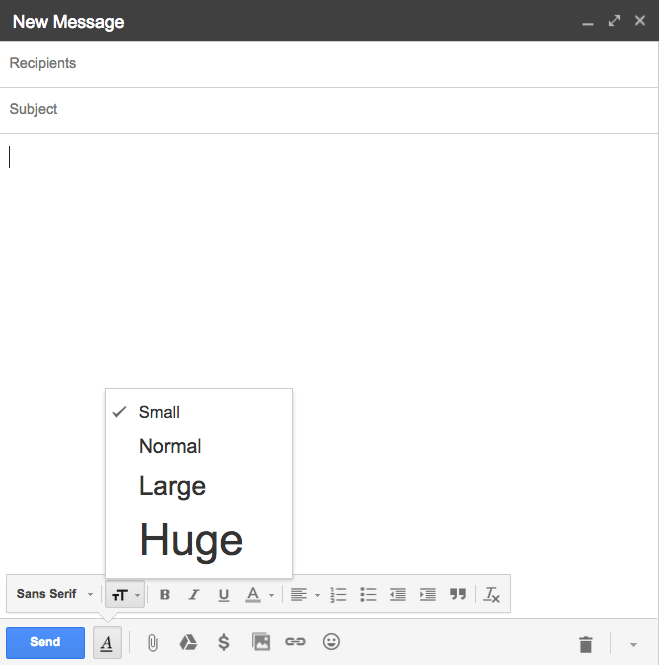
In my opinion, “small” is too small, and so is “normal.” Plus the term “normal” makes me feel shame for my old eyeballs. “Large” is too big, and “Huge” is just completely ridiculous.

Why can’t Google be “normal” and give us more choices?

​wtfUX ​Google!?

Keep these coming. Send them to us via Twitter or Facebook using the hastag #wtfUX or email them to: [email protected] with “#wtfUX” in the subject line. Include as much context as you can, so we get a full understanding of what the f%*k went wrong. Image of pygmy mouse courtesy Shutterstock.


post authorIndrani Stangl

Indrani Stangl
Indrani Stangl is one of the rare Silicon Valley natives who has not flown the coop (yet). She was embedded in the dot.com boom and bomb, and is watching the technological revolution from a front row seat. She works as an administrator at a famous higher education institution, has a private practice as a career coach, and runs a puppy rescue that saves 500 dogs a year from euthanasia. She is otherwise known as the Girl with DesignRage.

Tweet
Share
Post
Share
Email
Print

Related Articles

Find out how design leaders can build a more inclusive digital world from the ground up.

Article by Pavel Bukengolts
Championing Accessibility: a Path to Inclusive Design Leadership
  • The article highlights that designing for accessibility isn’t about following rules. It’s about making sure no one gets left out of the digital world.
  • The piece explores how building accessibility from the start, with the help of AI and the right mindset, makes the result better for everybody.
Share:Championing Accessibility: a Path to Inclusive Design Leadership
4 min read

Discover how a simple comprehension test reveals if mobile content is too hard to read.

Article by Paivi Salminen
Why Reading on Mobile Is Uniquely Challenging
  • The article explains why mobile reading is harder: small screens and distractions make people miss information even when it’s there.
  • It introduces the cloze test, which removes words to measure real understanding: comprehension drops from 39% on desktop to 19% on mobile.
  • The piece argues that mobile content needs simpler language because the real question is: Does this make sense when life gets in the way?
Share:Why Reading on Mobile Is Uniquely Challenging
4 min read

Learn how to build systems where design explicitly models development, handoff is automatic, and AI can extend your work reliably.

Article by Jim Gulsen
Your Design System Works in Figma. Does It Work in Code?
  • The article explains why many design systems don’t work well: designs made in Figma don’t translate well into code.
  • It introduces five practices: structure frames like code, use fewer components with more variants, organize by how both designers and developers actually work, let AI check your naming, and build documentation into your daily workflow.
  • The piece says that good design systems are the same in design and development, and when they match, everything just works.
Share:Your Design System Works in Figma. Does It Work in Code?
6 min read

Join the UX Magazine community!

Stay informed with exclusive content on the intersection of UX, AI agents, and agentic automation—essential reading for future-focused professionals.

Hello!

You're officially a member of the UX Magazine Community.
We're excited to have you with us!

Thank you!

To begin viewing member content, please verify your email.

Get Paid to Test AI Products

Earn an average of $100 per test by reviewing AI-first product experiences and sharing your feedback.

    Tell us about you. Enroll in the course.

      This website uses cookies to ensure you get the best experience on our website. Check our privacy policy and