Flag

We stand with Ukraine and our team members from Ukraine. Here are ways you can help

Get exclusive access to thought-provoking articles, bonus podcast content, and cutting-edge whitepapers. Become a member of the UX Magazine community today!

Home ›› Analytics and Tracking ›› A Simple Method to Analyze Task Flow

A Simple Method to Analyze Task Flow

by Khatia Gagnidze
3 min read
Share this post on
Tweet
Share
Post
Share
Email
Print

Save

This is a simple method to prove to ourselves and the stakeholders that the task flow we just created is worth being implemented.

As designers, we often have to prove to ourselves and the stakeholders that the task flow we just created is worthy of implementation. It’s difficult to find convincing arguments to make them believe that the upgraded flow will be successful (RIP Great ideas).

What is one of the best ways to show the efficiency of a product or functionality? Numbers! To be more specific — ideas validated with data. I found a simple method for such scenarios and share it with you in this article. 

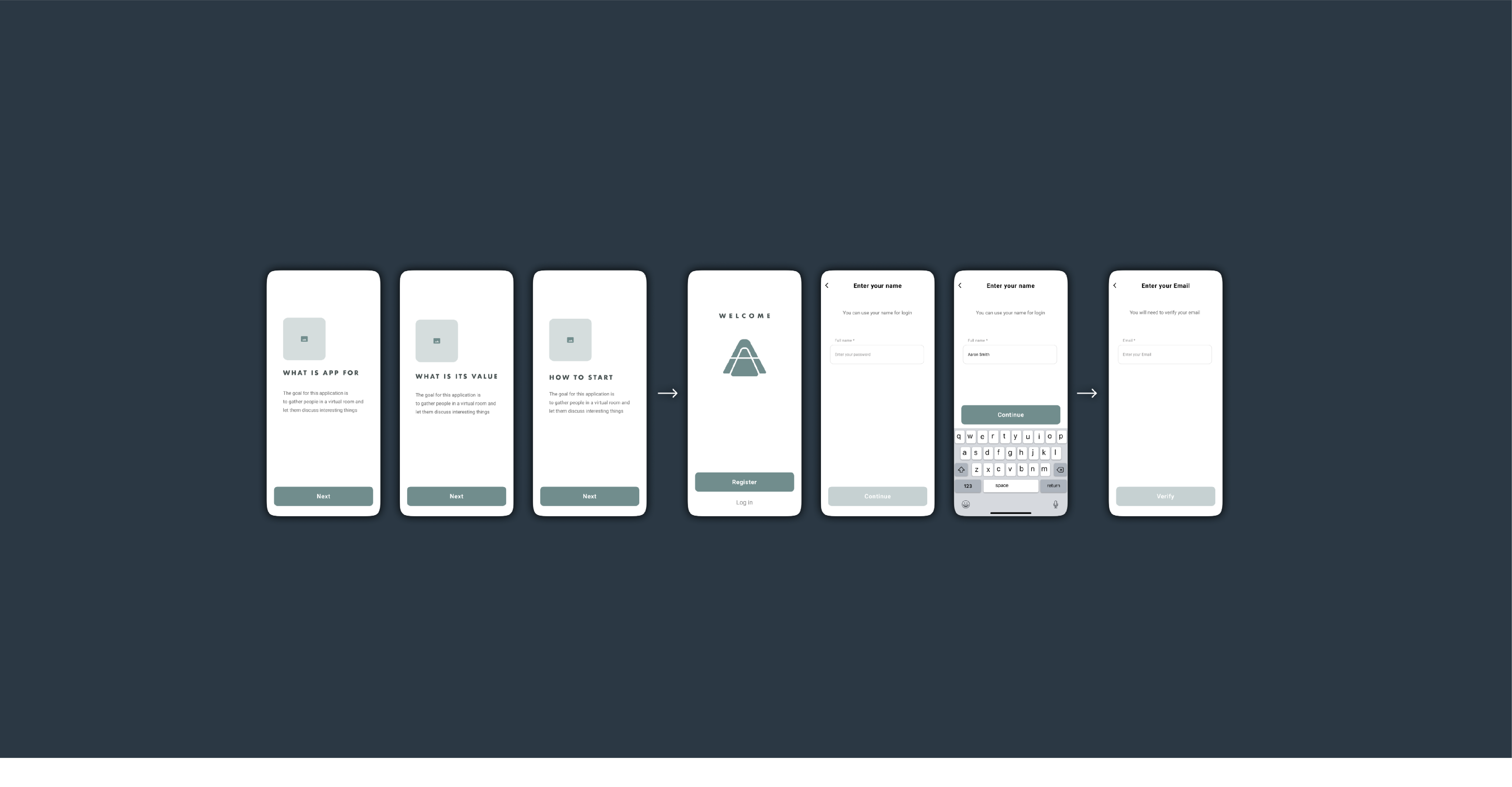
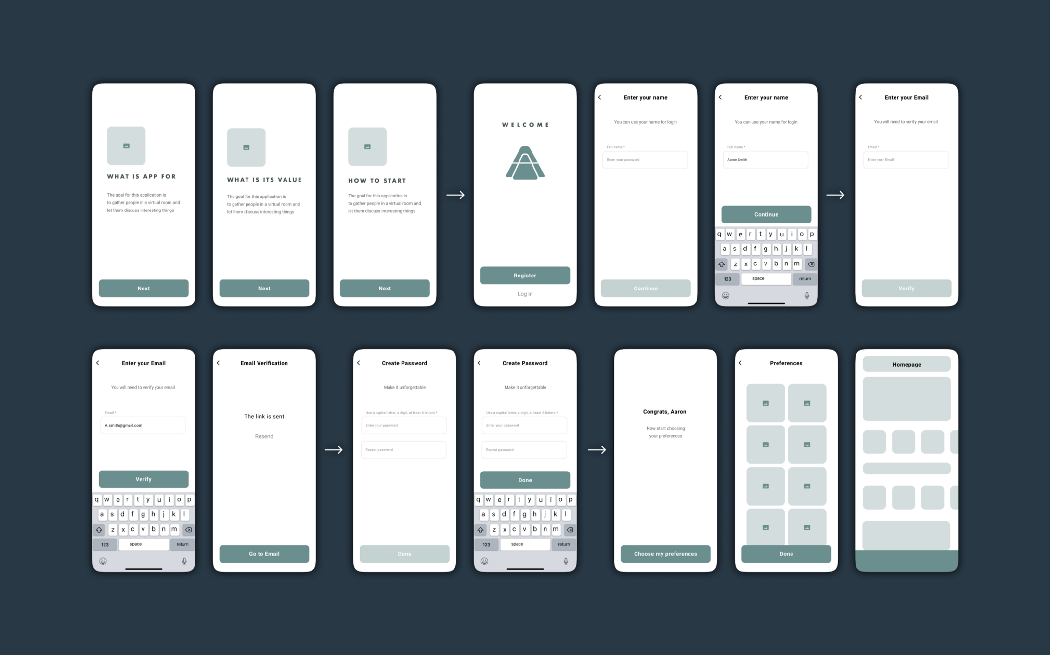
Take a look at the example of the onboarding flow:
 Analyze Task Flow

Onboarding flow

As soon as we have a flow, all the actions that a user will have to take should be written down (Note that these actions can vary depending on the type of flow; there might be gestures, fingerprints, and screens that disappear within a few seconds). In this example, there are four actions provided:

  1. Tap
  2. Type
  3. Open external link
  4. Scroll

Next, we need to evaluate them according to their importance (mental workload), time, and effort spent. For example, Scroll seems to be the easiest task as a user doesn’t have to make a crucial decision — they merely look through the content fast while scrolling. Therefore I assigned it 1 point. It is a very subjective part of the process, so feel free to experiment while evaluating. In my case Tap is 3 points, Type is 5 points, and External link is 10 points (this is the highest because users have to leave the app, which can be dangerous).

Assess the screens

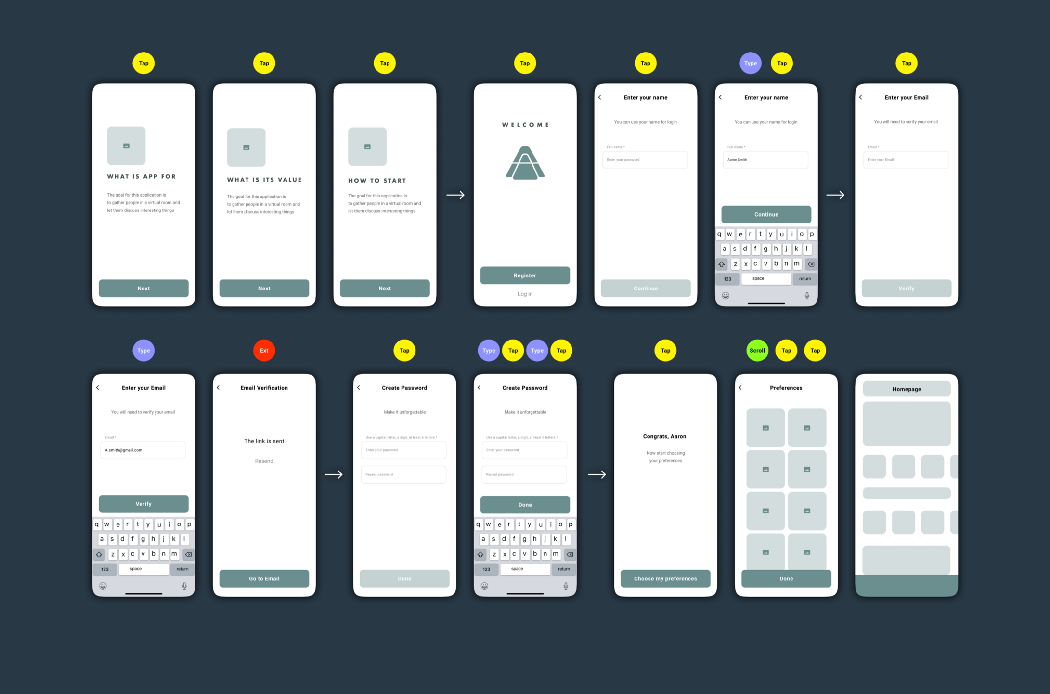
Place signs to identify each action near the corresponding screens:
 Analyze Task Flow

12 Taps / 4 Types / 1 External link / 1 Scroll

Simplify the flow

Now it is time to simplify the flow and count the actions again. I decided to turn the first four screens into one, placed all types of inputs together, and eliminated the number of password input fields. Here is the simplified version of the flow:
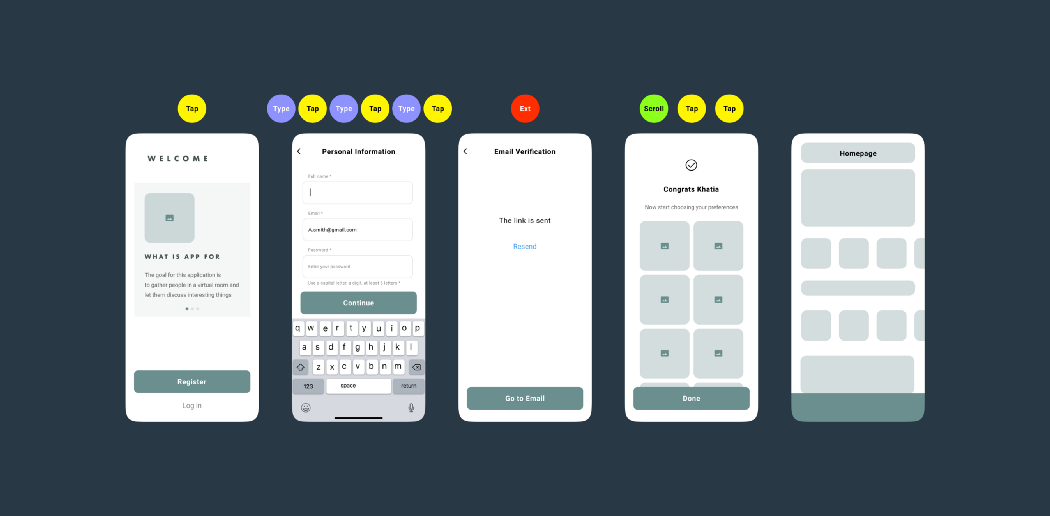
 Analyze Task Flow

6 Taps / 3 Types / 1 External link / 1 Scroll

Calculate

As soon as we evaluate initial and updated flows, it is time to open excel and create two pages: one for the initial version and the other for the updated version. Enter simple formulas in the third column (e.x. =B1*3 — in case of taps — the number of taps multiplied by its value).
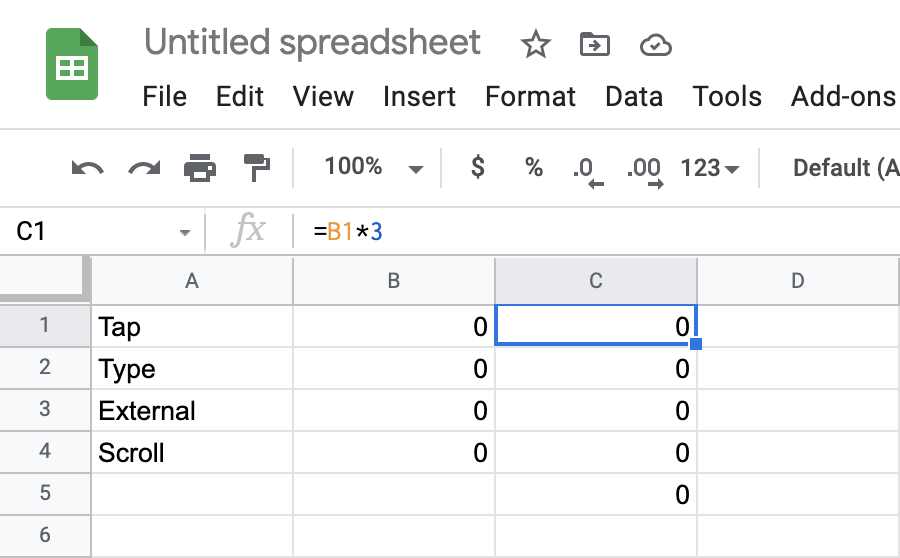
 Analyze Task Flow

Tap counts =B1*3

As soon as there are formulas entered in the C column, fill in the B column with digits. The total score will appear in the 5th row & C column (enter =SUM(C1:C4 in it to view the result).
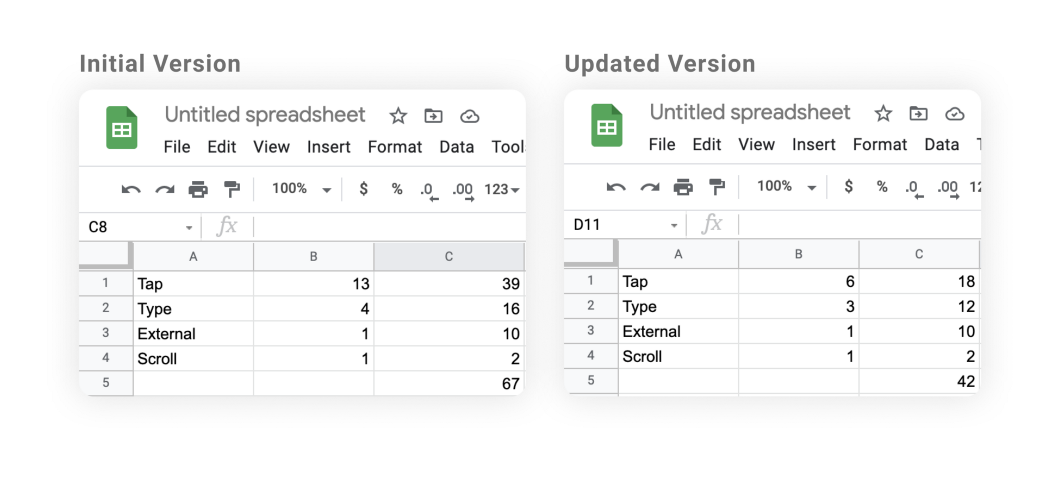
 Analyze Task Flow

Working in Excel is optional, you can calculate everything using just pen and paper

Now you can see the results: the updated flow is 37% ((67–42)/67×100=37) simpler than the original one!

When is the method useful?

This method is useful while redesigning a website or an app, and while simplifying the most frequently used flows. Most importantly, as I mentioned above, all the data gathered can enforce your arguments during the negotiations with stakeholders.


post authorKhatia Gagnidze

Khatia Gagnidze
Khatia is a designer with over 6 years of experience in product design, specializing in fintech, eCommerce, blockchain, banking, social network, and other industries. She has successfully designed, UX audited, and conducted research both remotely and on-site for companies worldwide, including in Australia, Singapore, UAE, France, and the USA.

Tweet
Share
Post
Share
Email
Print

Related Articles

Learn about common Agile anti-patterns. Lessons from Laura Klein.

Article by Paivi Salminen
Unhappy Agile Teams Are Unhappy in Familiar Ways
  • The article makes a sharp point: struggling Agile teams love to think their problems are unique. They rarely are.
  • It breaks down the traps that quietly kill Agile teams, like endless feature shipping, siloed workflows, and design treated as an afterthought.
  • The piece reminds us that looking Agile and actually being Agile are two very different things.
Share:Unhappy Agile Teams Are Unhappy in Familiar Ways
6 min read

Take a hard look at the fine line between good design and digital dependency.

Article by Tushar Deshmukh
Designing for Dependence: When UX Turns Tools into Traps
  • The article reveals how digital products are no longer just tools. They’re engineered to keep you hooked, often without you realizing it.
  • It challenges designers to ask: Are we building products that serve people, or ones that quietly exploit them?
  • The piece highlights that ethical design isn’t about removing persuasion. It’s about being honest and giving users the freedom to walk away.
Share:Designing for Dependence: When UX Turns Tools into Traps
8 min read

Find out how design leaders can build a more inclusive digital world from the ground up.

Article by Pavel Bukengolts
Championing Accessibility: a Path to Inclusive Design Leadership
  • The article highlights that designing for accessibility isn’t about following rules. It’s about making sure no one gets left out of the digital world.
  • The piece explores how building accessibility from the start, with the help of AI and the right mindset, makes the result better for everybody.
Share:Championing Accessibility: a Path to Inclusive Design Leadership
4 min read

Join the UX Magazine community!

Stay informed with exclusive content on the intersection of UX, AI agents, and agentic automation—essential reading for future-focused professionals.

Hello!

You're officially a member of the UX Magazine Community.
We're excited to have you with us!

Thank you!

To begin viewing member content, please verify your email.

Get Paid to Test AI Products

Earn an average of $100 per test by reviewing AI-first product experiences and sharing your feedback.

    Tell us about you. Enroll in the course.

      This website uses cookies to ensure you get the best experience on our website. Check our privacy policy and